2013/01/23

Enabling Change Block Tracking (CBT) on a Virtual Machine (VMware vSphere 5.1)

Update: 2013/07/02 I wrote another post about CBT and create a re-usable PowerShell function

I recently had to enable CBT in my VMware vSphere environment, on a good amount of Virtual Machines.

What is Change Block Tracking (CBT) ? If you are not familiar with CBT,  checkout the following articles:


How to implement CBT, what do you need ?

  • VM version 7 at least,
  • No snapshot on your VM
  • Enable CBT,
  • Finally the VM must go through a stun-unstun cycle (power on, resume after suspend, migrate, or snapshot create/delete/revert) before the reconfiguration takes effect.

How to Enable CBT on your VM ? (GUI)

Note: When the VM is Powered ON you won't be able to access those settings.
However, It is possible to do it via PowerShell even when the VM is started. :-)  (see below)

Navigate to Configuration Parameters and add the following Entries.

Right click on your VM, select Edit Settings/Options Tab/Advanced/General.
Click on Configuration Parameters and add the following entries


2013/01/20

WS2012 Storage - NFS Server - Configure NFS for VMware vSphere 5.1 Home Lab


The following procedure show how to setup a NFS Server hosted on Windows Server 2012 for backend storage of my VMware vSphere Server 5.1 Home Lab.

You can also check my post on Creating an iSCSI Target Server on Windows Server 2012.


Overview

In the following post I will talk about the following points:
  • Terminology
  • Using PowerShell
    • Add the Role NFS Server Feature on Microsoft Windows Server 2012
    • Create the Share and Set the NFS permissions
    • Add the NFS datastore to VMware vSphere 5.1
  • Using the GUI (Graphical User Interface)
    • Add the Role NFS Server Feature on Microsoft Windows Server 2012
    • Create the Share and Set the NFS permissions
    • Add the NFS datastore to VMware vSphere 5.1


NFS Storage

Quick overview of my NFS Service architecture in my Home Lab


2013/01/17

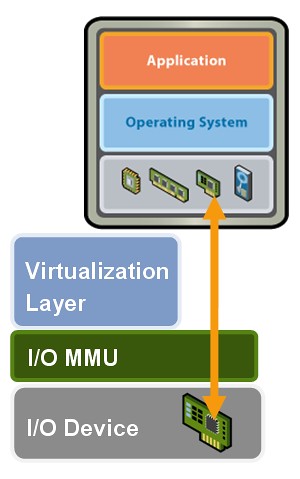
DirectPath I/O supported with ASUS M5A97 R2.0/AMD FX-8350


My HomeLab configuration:
MotherBoard: ASUS M5A97 R2.0
CPU : AMD FX-8350 (8 Cores - 4.0Ghz)

DirectPath IO


How to DirectPath I/O on the ASUS M5A97 R2.0
-Enter into the BIOS and navigate to the Advanced Settings (using F7)
-Under North Bridge Configuration
-IOMMU is DISABLED by default, set to ENABLED

2013/01/13

Windows PowerShell Language Specification

Microsoft just released two very interesting documents part of Microsoft Open Specification:


Those documents defines all the aspects of PowerShell Languages v2.0 and v3.0.
I highly recommend any beginners, intermediates and guru to take a look at those files.

2013/01/07

Get-LocalGroupAllMembers

In my previous post, I explain my PowerShell function to retrieve the local administrators group membership.
Today I will go a bit further and find the nested members from the Active Directory.

Get-LocalGroupAllMembers


The following scripts query a localgroup on the localhost or a remote computer, and gather all the local and domain members (direct and nested).

By Default, if you do not specify any parameter, the function will query the Localhost and the Localgroup "Administrators".

Dot Sourcing

Once your Powershell is launched you can load the function using the Dot Sourcing method:
. ./Get-LocalGroupAllMembers.ps1

Usage


Get-LocalGroupAllMembers -ComputerName SERVER01 -GroupName "Administrators"

2012/12/31

Get-LocalGroupMembership (Using ADSI/WinNT)

Updated (2013/06/03): I added some error handeling/verbose/testing. You are now able to pass multiple computers to the ComputerName parameter.

Intro

Recently I had to do an Audit at my work to find who was Local Administrators on a bunch of Servers.
That might sounds easy when you just have to check 2 or 3 servers... but what if you have to get the information for hundreds! Plus ... I know the Auditor would ask me this same question every few months to prove that the list did not change...Arghhh!

Once again PowerShell saved me so much time on that one!!

Get-LocalGroupMembership

Get the specified local group membership on a local or remote computer.
By default, if you don't specify any parameter, It will query the local group "Administrators" on the localhost.

For some reason WMI bug with some of my Windows Server 2003 and does not return some Domain Groups where Windows Server 2008/2012 work just fine.

Here is my ADSI/WinNT version, It fixed my problem.
In the next post I will go a bit further and get the membership from the domain groups ;-)

Running the Function


The Code

Function Get-LocalGroupMembership {
<#
.Synopsis
    Get the local group membership.
            
.Description
    Get the local group membership.
            
.Parameter ComputerName
    Name of the Computer to get group members. Default is "localhost".
            
.Parameter GroupName
    Name of the GroupName to get members from. Default is "Administrators".
            
.Example
    Get-LocalGroupMembership
    Description
    -----------
    Get the Administrators group membership for the localhost
            
.Example
    Get-LocalGroupMembership -ComputerName SERVER01 -GroupName "Remote Desktop Users"
    Description
    -----------
    Get the membership for the the group "Remote Desktop Users" on the computer SERVER01

.Example
    Get-LocalGroupMembership -ComputerName SERVER01,SERVER02 -GroupName "Administrators"
    Description
    -----------
    Get the membership for the the group "Administrators" on the computers SERVER01 and SERVER02

.OUTPUTS
    PSCustomObject
            
.INPUTS
    Array
            
.Link
    N/A
        
.Notes
    NAME:      Get-LocalGroupMembership
    AUTHOR:    Francois-Xavier Cat
    WEBSITE:   www.LazyWinAdmin.com
#>

 
 [Cmdletbinding()]

 PARAM (
        [alias('DnsHostName','__SERVER','Computer','IPAddress')]
  [Parameter(ValueFromPipelineByPropertyName=$true,ValueFromPipeline=$true)]
  [string[]]$ComputerName = $env:COMPUTERNAME,
  
  [string]$GroupName = "Administrators"

  )
    BEGIN{
    }#BEGIN BLOCK

    PROCESS{
        foreach ($Computer in $ComputerName){
            TRY{
                $Everything_is_OK = $true

                # Testing the connection
                Write-Verbose -Message "$Computer - Testing connection..."
                Test-Connection -ComputerName $Computer -Count 1 -ErrorAction Stop |Out-Null
                     
                # Get the members for the group and computer specified
                Write-Verbose -Message "$Computer - Querying..."
             $Group = [ADSI]"WinNT://$Computer/$GroupName,group"
             $Members = @($group.psbase.Invoke("Members"))
            }#TRY
            CATCH{
                $Everything_is_OK = $false
                Write-Warning -Message "Something went wrong on $Computer"
                Write-Verbose -Message "Error on $Computer"
                }#Catch
        
            IF($Everything_is_OK){
             # Format the Output
                Write-Verbose -Message "$Computer - Formatting Data"
             $members | ForEach-Object {
              $name = $_.GetType().InvokeMember("Name", 'GetProperty', $null, $_, $null)
              $class = $_.GetType().InvokeMember("Class", 'GetProperty', $null, $_, $null)
              $path = $_.GetType().InvokeMember("ADsPath", 'GetProperty', $null, $_, $null)
  
              # Find out if this is a local or domain object
              if ($path -like "*/$Computer/*"){
               $Type = "Local"
               }
              else {$Type = "Domain"
              }

              $Details = "" | Select-Object ComputerName,Account,Class,Group,Path,Type
              $Details.ComputerName = $Computer
              $Details.Account = $name
              $Details.Class = $class
                    $Details.Group = $GroupName
              $details.Path = $path
              $details.Type = $type
  
              # Show the Output
                    $Details
             }
            }#IF(Everything_is_OK)
        }#Foreach
    }#PROCESS BLOCK

    END{Write-Verbose -Message "Script Done"}#END BLOCK
}#Function Get-LocalGroupMembership


Thanks for Reading! If you have any questions, leave a comment or send me an email at fxcat@lazywinadmin.com. I invite you to follow me on Twitter: @lazywinadm

2012/12/29

Move Computers Object between two organizational units (OU) - What are the permissions required ?

Today I was playing a bit in my lab with PowerShell and AD Computer Objects.
I automate the daily cleanup of Inactive Computer Object and move them to a specific OU.
This script is running with his own service account, the privileges required are specified below.

Move Computer Object INSIDE an OU:
-Create Computer

Move Computer Object OUTSIDE an OU:
-Delete Computer
-Write All Properties

As an example, here I was using the "Delegation of Control Wizard" to allow the "Move out"


2012/12/09

FreeNas 8.3 - Creating a RAID volume and Configure iSCSI

FreeNAS is a tiny Open Source FreeBSD-based operating system which provides free Network-Attached Storage (NAS) services (CIFS, FTP, NFS, ...). It supports sharing across Windows, Apple, and UNIX-like systems.

FreeNAS 8 includes ZFS, which supports high storage capacities and integrates file systems and volume management into a single piece of software.


Overview

In the following post I will cover the following points:
  • Introduction
  • Terminology
  • Raid Volume Configuration
    • Connecting to the FreeNas HTTP Interface
    • Creating the RAID Volume
  • iSCSI Configuration
    • Adding a Portal
    • Adding an Initiator
    • Adding a Target
    • Adding a File Extent
    • Adding a Target / Extent association
    • Enabling the iSCSI Service
  • Configuring the iSCSI Initiator on VMware vSphere 5.1


Introduction

Using FreeNAS 8.3, I need to create a RAID Volume, configure iSCSI and present it to my VMware VSphere 5.1 environment.

Note: If you are not familiar with some of the iSCSI terms used below (target, initiator, extent...) please check the following webpage: http://doc.freenas.org/index.php/ISCSI


Overview of my iSCSI Lab Architecture