2013/03/26

How to Deploy an OVF Template from a Remote Web Server


In the following post I am going to explain how to deploy an OVF Template from an URL.


The VMware vSphere Client allows you to deploy and export virtual machines, virtual appliances, and vApps stored in Open Virtual Machine Format (OVF).

An appliance is a pre-configured virtual machine that typically includes a preinstalled guest operating system and other software.


Methods to deploy an OVF Template
Using vSphere Client you have a couple of methods available to you :
  • Remote web server (URL)
  • Local Disk, USB keychain drives or CD/DVD drives
  • Shared network drives
  • OVFTool (Command-line utility from VMware that allows you to import and export OVF packages to and from a wide variety of VMware platform products.)

In most cases, Administrators would probably browse their Local Disks or Network Shares.
However, In my case I want to deploy a template using the local datastore of my ESXi host, using an URL.

2013/03/05

The Simplest Way to Create a Bootable Windows Server 2012 or Windows 8 USB Key

After I passed my VCP510-DV last week, I wanted to rebuild my Home Lab using Windows Server 2012 for the Storage part, instead of FreeNas.

Part of the rebuild, I needed to install Windows Server 2012 on top of the old FreeNas box. Hard task since I don't have a DVD player in the case... :-/

Hence, USB Boot it is...

I was surprise to see how easy it is to create a Bootable Windows Server 2012 (R1 or R2)/Windows 8/8.1 USB Key.

What do you need:


Once Installed, Launch Windows 7 USB/Download Tool
The first step is to select your ISO

2013/02/25

The PowerShell Certification

Update 2013/07/07: It seems that the Certification is now ONLY available after doing the in-person class offered by Concentrated Technology :-(

Don Jones just announced the creation of the PowerShell "Certification"!!

This is available for anybody who want to test their PowerShell scripting knowledge. The PowerShell "certification" is under the VERIFIED EFFECTIVE™ brand.

The certification name: Windows PowerShell 3.0 Toolmaking. 


More information:


To pass the certification you will need to pay the Examination cost (150$) and complete/return the Program License Agreement file. Once those steps complete you will then receive your scenario.

2013/02/18

Winter Scripting Games 2013 - Practice Event 2


Just a quick post on the script I submit for the second practice event of the Winter Scripting Games 2013 (last week).


Practice Event 2 - Covering Your Assets
Your organization is preparing to renew maintenance contracts on all of your server computers. You need to provide management with a report that details each inventory information for each server. Most of the servers do not have Windows PowerShell installed. None of the servers a separated from your client computer by a firewall. Computer names may be specified by a variety of means; your function must accept any collection of strings as computer names.

Minimum Requirements 
Optional Criteria 
  • Display optional verbose output showing the computer name being contacted
  • Prompt for computer names if none are specified when the function is run
  • Accept computer names as strings from the pipeline
Desired Output 
  • ComputerName Model Manufacturer LogicalProcs PhysicalRAM BIOSSerial

My Script

# NAME  : Get-ComputerInventory
# AUTHOR: Francois-Xavier Cat
# EMAIL : fxcat@LazyWinAdmin.com
# DATE  : 2013/02/10 

Function Get-ComputerInventory {
        <#
        .SYNOPSIS 
        The Get-ComputerInventory function gets information about a local or 
        Remote machine(s) specified by the parameter ComputerName.
    

2013/02/10

Winter Scripting Games 2013 - Practice Event 1

The Winter Scripting Games 2013 started last week with the first practice event.

Unfortunately for me, I was not able to post my script on time. The first Practice event was due on the Tuesday, 5th of February... 11:59 PM GMT! I assume I had until midnight my time..... (My timezone is East GMT-5) 
;-(

If you want to join the Winter Scripting Games, check the following TheScriptingGames website for more information and the The Competitor Guide.

Summary: Practice Event 1 - Sizing up the Disks
You have been asked to create a Windows PowerShell advanced function named Get-DiskSizeInfo. It must accept one or more computer names, and use WMI or CIM to query each computer. For each computer, it must display the percentage of free space, drive letter, total size in gigabytes, and free space in gigabytes. If a specified computer cannot be contacted, the function must log the computer name to C:\Errors.txt and display no error message.
Minimum Requirements 
Optional Criteria
  • Display optional verbose output showing the computer name being contacted

My Script

Function Get-DiskSizeInfo {
        <#
        .DESCRIPTION
        Check the Disk(s) Size and remaining freespace.

        .PARAMETER ComputerName
        Specify the computername(s)

        .INPUTS
        System.String

        .OUTPUTS
        System.Management.Automation.PSObject

2013/01/23

Enabling Change Block Tracking (CBT) on a Virtual Machine (VMware vSphere 5.1)

Update: 2013/07/02 I wrote another post about CBT and create a re-usable PowerShell function

I recently had to enable CBT in my VMware vSphere environment, on a good amount of Virtual Machines.

What is Change Block Tracking (CBT) ? If you are not familiar with CBT,  checkout the following articles:


How to implement CBT, what do you need ?

  • VM version 7 at least,
  • No snapshot on your VM
  • Enable CBT,
  • Finally the VM must go through a stun-unstun cycle (power on, resume after suspend, migrate, or snapshot create/delete/revert) before the reconfiguration takes effect.

How to Enable CBT on your VM ? (GUI)

Note: When the VM is Powered ON you won't be able to access those settings.
However, It is possible to do it via PowerShell even when the VM is started. :-)  (see below)

Navigate to Configuration Parameters and add the following Entries.

Right click on your VM, select Edit Settings/Options Tab/Advanced/General.
Click on Configuration Parameters and add the following entries


2013/01/20

WS2012 Storage - NFS Server - Configure NFS for VMware vSphere 5.1 Home Lab


The following procedure show how to setup a NFS Server hosted on Windows Server 2012 for backend storage of my VMware vSphere Server 5.1 Home Lab.

You can also check my post on Creating an iSCSI Target Server on Windows Server 2012.


Overview

In the following post I will talk about the following points:
  • Terminology
  • Using PowerShell
    • Add the Role NFS Server Feature on Microsoft Windows Server 2012
    • Create the Share and Set the NFS permissions
    • Add the NFS datastore to VMware vSphere 5.1
  • Using the GUI (Graphical User Interface)
    • Add the Role NFS Server Feature on Microsoft Windows Server 2012
    • Create the Share and Set the NFS permissions
    • Add the NFS datastore to VMware vSphere 5.1


NFS Storage

Quick overview of my NFS Service architecture in my Home Lab


2013/01/17

DirectPath I/O supported with ASUS M5A97 R2.0/AMD FX-8350


My HomeLab configuration:
MotherBoard: ASUS M5A97 R2.0
CPU : AMD FX-8350 (8 Cores - 4.0Ghz)

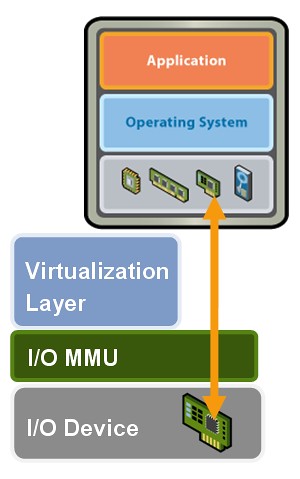
DirectPath IO


How to DirectPath I/O on the ASUS M5A97 R2.0
-Enter into the BIOS and navigate to the Advanced Settings (using F7)
-Under North Bridge Configuration
-IOMMU is DISABLED by default, set to ENABLED